Six Months Into Claude: 15 Tricks That Genuinely Work, and Most People Don't Know Them
Fifteen Claude tricks from six months of daily use: XML tags, Projects, Artifacts, the reroll habit, plus the 10 prompt templates I run every day.
On this page
I moved from ChatGPT to Claude six months ago. Let me be clear up front — this isn’t a “one crushes the other” story. I still keep both accounts, each with its own jobs. But three things won me over for good: writing long-form content, chewing through long documents, and fixing code. On those three, Claude is genuinely stronger — strong enough that my daily workflow now can’t rotate around it.
At first I also thought “it’s just okay.” The problem was how I was using it. Claude doesn’t do well with lazy prompts like “write me an article about X.” Feed it differently and you get a completely different animal. After six months of tinkering, here are my 10 most useful tricks plus the 10 prompt templates I use every day, all dumped out in one go.
5 basic tricks
1. Feed context in XML tags, not walls of text
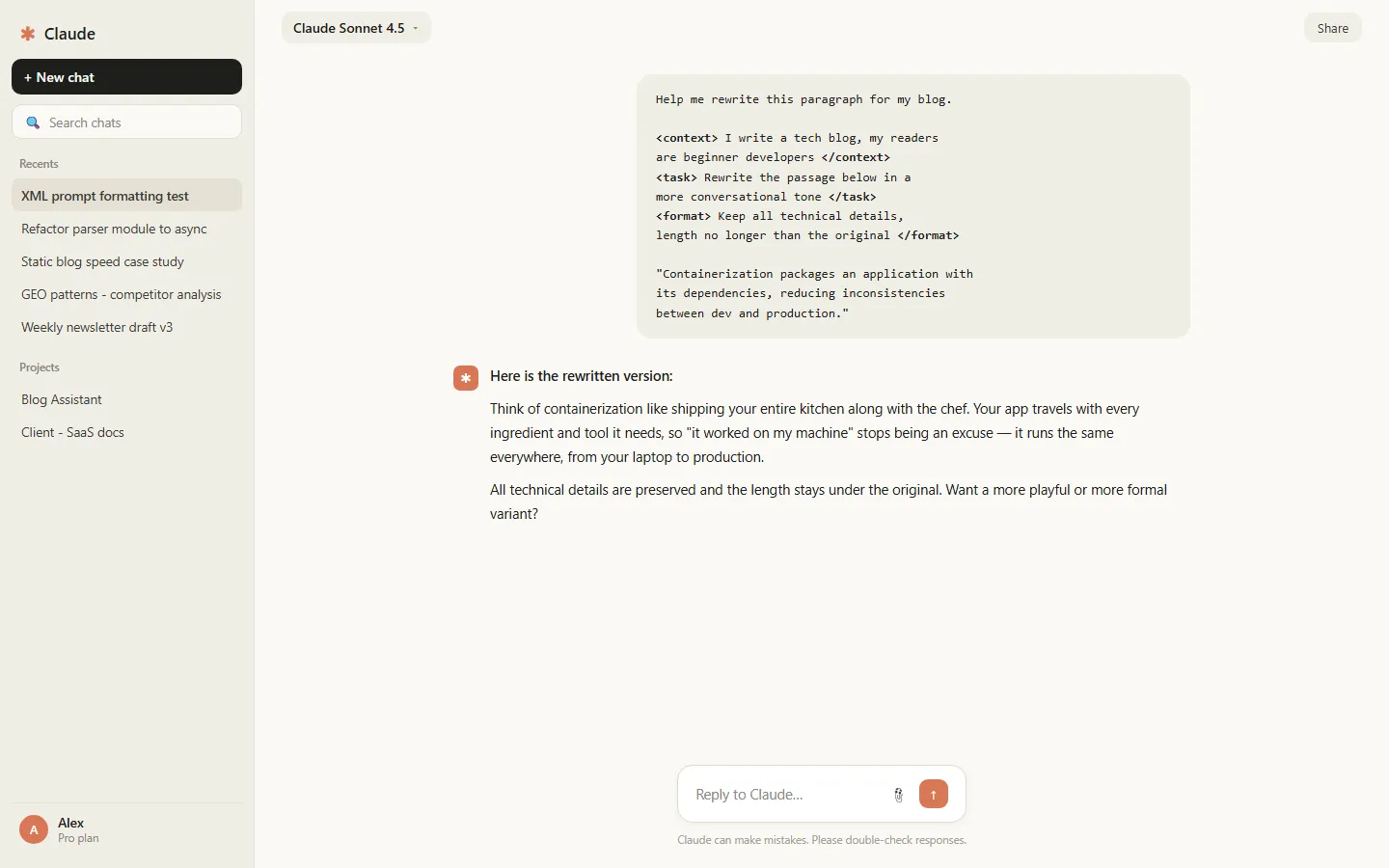
Claude is unusually sensitive to XML tags — this is one of the biggest differences from its competitors. Keep background, task, and format requirements in separate blocks:
<context>I write a tech blog, my readers are beginner developers</context>
<task>Rewrite the passage below in a more conversational tone</task>
<format>Keep all technical details, length no longer than the original</format>
Once you hang the tags, its adherence to your requirements visibly improves. This habit is worth building.
2. Prefill the opening to skip the pleasantries
Tired of “Sure, I’d be happy to help…”? Write the beginning of its answer for it. If you type “Here is the revised version:” first, it just carries on from there, and the filler disappears. In the API this is called prefill; typing it manually in the web UI works just as well.
3. Ask for an outline before the full text
Don’t ask for long pieces in one shot. First say “give me three outline options and explain what scenario each fits,” pick one, then have it expand. This step intercepts about eighty percent of off-track long drafts, at the lowest possible rework cost.
4. Put your standing materials in Projects
Who you’re writing for, what style, what the taboos are — anything that never changes goes into a Project, and every conversation inherits that context automatically. I loaded my blog’s past articles and a style guide into one, and now its drafts basically don’t need major edits.

5. When a conversation goes dumb, have it write a handoff summary
Chat long enough and it “forgets.” Don’t limp along — ask it to summarize the current progress, conclusions, and open items into one paragraph, start a new chat, and paste the summary in. A handoff document it writes itself is more accurate than what you’d reconstruct from memory.
5 advanced tricks
6. For long documents, map first, then read deep
Claude can swallow book-length PDFs in one go. Don’t start asking for details at the begining. Step one: have it output a structural map of the whole thing with key points per chapter. Step two: pick a chapter and dig deep. Reverse the order and you’ll get a pile of misaligned answers.
7. Claude Code — the construction crew in your terminal
Subscribers can install Claude Code in the terminal. It doesn’t just answer coding questions; it edits files itself, runs commands, reads the errors, and fixes them:
npm install -g @anthropic-ai/claude-code
claude "Refactor all callback functions in the src directory to async/await, and run the tests when done"
I once handed it a legacy spaghetti module to refactor; after my review it went straight into the main branch. It’s a different species from the web version. If you write code, you have to try this.
8. Plug Claude into your computer with MCP
Through MCP, the web version of Claude can read local files and query databases directly. The config is a few lines of JSON — I wrote a whole beginner’s guide to MCP earlier, so I won’t repeat it here. One warning: give it a single folder and the minimum permissions it needs. Don’t skip that step because it feels fussy.
9. Artifacts: finished products while you chat
Ask Claude to render code, pages, or documents into the standalone Artifacts window, and every revision shows its result instantly. Great for prototyping little tools, tweaking CSS, or writing interactive docs — it saves alot of copy-pasting.

10. Write it a style sheet
Turn “words to avoid, paragraph length, tone” into a document and keep it around; paste it before any writing task. Heavy AI flavor is usually a missing-rules problem, not a model problem.
The 10 prompt templates I use daily
Copy as-is; swap out what’s in the brackets:
Compression: Compress this text to half its length, keep every point and example, cut the repetition and filler: [paste]
Conversational rewrite: Rewrite the content below in the tone of a friend chatting, questions and short sentences allowed: [paste]
Ruthless editor: You are a picky editor-in-chief. List the 5 biggest problems with this article, sorted by severity, one sentence of fix direction for each: [paste]
Email drafting: Write an email to [person] about [matter], polite but not groveling, three paragraphs max, ending with a clear request for a reply: [paste]
Code review: Review this code, focusing on edge cases and performance. Tag each issue with a severity level: [paste]
Error diagnosis: I hit this error: [paste error]. Related code: [paste code]. List the 3 most likely causes first, then a way to verify each one.
Feynman learning: Explain [concept] using analogies I can understand. Assume I’m smart but zero-background in this field. End with one question I can use to test myself.
Meeting notes to action items: Here are the meeting notes: [paste]. Extract all action items in the format: owner, task, deadline. Anything without a clear owner goes in a separate list.
Data interpretation: Here’s my data: [paste table]. Tell me the 3 most valuable findings, and for each one explain which number it came from.
Localized translation: Translate this into English so it reads like a blog post by a native speaker, not a translation. Keep industry-standard terms as-is: [paste]
Where NOT to use Claude
Some honest words. No image generation, and multimodal is a step behind ChatGPT — drawing tasks go elsewhere. For quick lookups that need up-to-the-minute info, it tends to serve you stale answers, and it will state nonsense with total confidence. Either use it in a mode with web search on, or cross-check at the competitor. And for pure voice chats and companionship, ChatGPT’s voice experience is clearly better. Using the wrong tool wastes more time than using a worse tool.
Free vs. paid — which one is worth it
The free tier works, but it has limits: queues at peak hours, and long conversations and long documents are mostly off the table. Pro is $20 a month. The judgment call is simple: if you handle long documents weekly, code seriously, or want Claude Code, subscribe — it pays for itself fast. If you ask a handful of questions a day, the free tier holds up; don’t rush for your wallet. My advice: spend a week on the free tier learning the tricks first, then decide. Don’t reverse the order.
My actual setup
My current division of labor: writing, long documents, code refactoring, and data processing go to Claude; voice chats, image generation, and real-time quick lookups go to ChatGPT. Not either-or — each does what it’s best at.
Don’t take this post as an ad. I pay for both subscriptions out of my own pocket. If you only try one thing, make it trick 1 and trick 7 — one changes how you write prompts, the other changes how you work.
Frequently asked questions
What are XML tags in Claude used for?
They label different parts of your prompt — instructions, context, examples — so Claude knows what each block is for instead of guessing.
Is Claude Projects worth it on the free plan?
Projects are a paid feature. On the free plan you can mimic the basics by pasting standing instructions at the top of each chat.
Which Claude trick saves the most time?
Asking Claude to ask you clarifying questions before it answers. One extra round-trip eliminates most rewrites.