I Tried 30+ MCP Servers. These 10 Actually Earned Their Keep
Looking for the best MCP servers? We installed more than thirty and kept ten. Here is what survived, what we deleted, and the security pass.
On this page
So how many MCP servers are out there right now? I counted last week — the registry is pushing 6,000+. To put that in perspective: if you tested 10 a day, it would take you almost two years, and by then half of them would be abandoned.
So don’t do what I did.
When MCP blew up a while back, I went into full hoarder mode. Every new server I saw, I installed. Over two weeks or so I tried more than 30 of them, installing and deleting in loops. Most got removed the same day: some were hilariously thin (yes, there’s a dedicated calculator server — the model can do math without one), some duplicated features the client already has, and some just wouldn’t connect at all. I burned an entire evening on one before realizing its repo hadn’t been touched in six months.
Only 10 survived my daily workflow.
This post is the summary of that two-week dumpster dive: which ones are genuinely great, which ones to skip, how to install them, and the security traps to avoid. It should save you at least one weekend.
MCP in 30 Seconds
MCP (Model Context Protocol) is an open protocol that works like a USB-C port for AI apps: clients use it to plug into external tools — reading files, querying databases, driving a browser, whatever. I covered the fundamentals in my earlier intro post, so here I’ll go straight to the good stuff.
The 10 That Survived, By Category

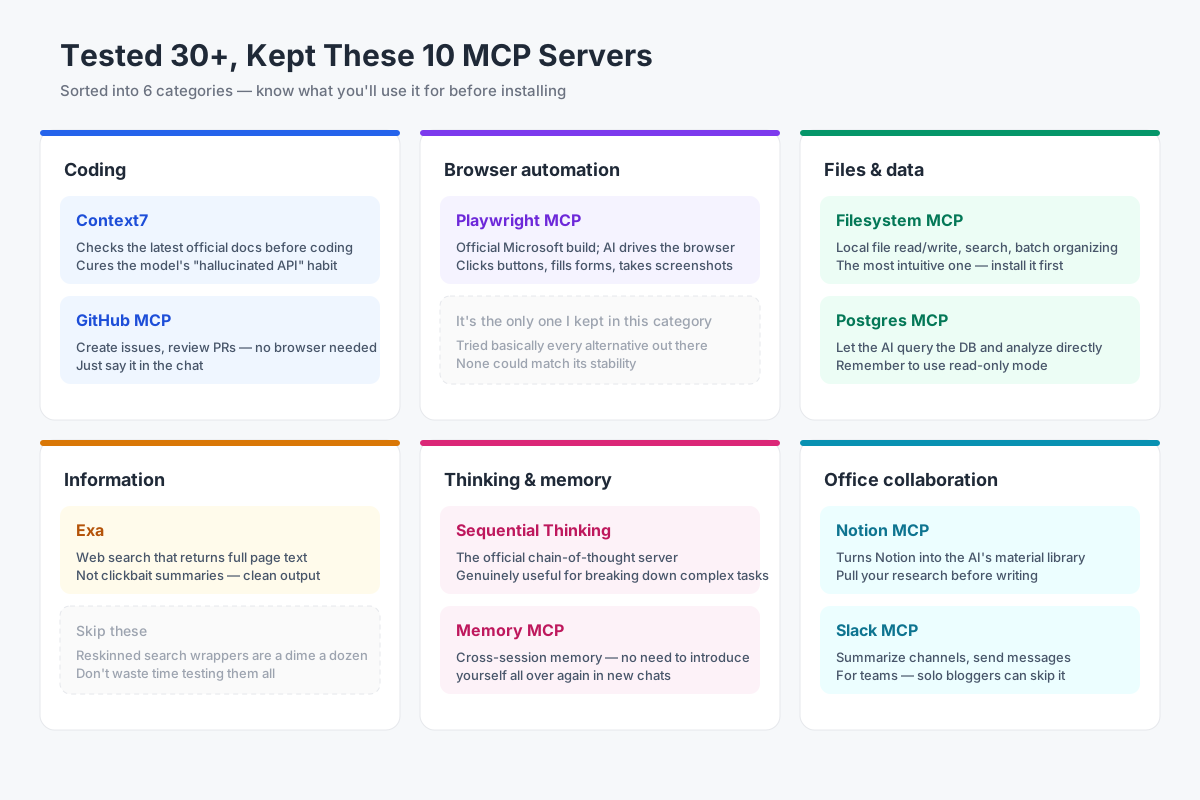
Category overview of the 10 MCP servers
Coding tools, file and data tools, information fetching, office collaboration, and thinking aids — roughly five buckets. Let’s go through each one: what it does, how to install it, what I actually use it for, and where it falls short.
The Detailed Rundown
1. Context7 — If You Write Code, Install This One
Official site: https://context7.com
What it does: Models have a knowledge cutoff, so when you ask for code using a new API version, they confidently write against the old one. Context7 feeds the model the latest official docs for your library right before it writes code.
How to install: npx -y @upstash/context7-mcp. Register it in your config — no API key needed.
Real-world use: I asked for a dynamic route in Next.js 15. Before, the model would happily use long-deprecated syntax with total confidence. Now it checks the docs first, and my first-run success rate has visibly gone up.

Context7 in action
Downsides: It only covers public libraries, so your company’s internal docs are out of luck. Obscure libraries occasionally time out. But for anyone who codes, this one is close to free money.
2. Playwright MCP — Your AI Can Drive a Browser Now
What it does: Microsoft’s official server. It lets the AI operate a browser like a human: open pages, click buttons, fill forms, take screenshots — step by step, all visible.
How to install: npx @playwright/mcp@latest. Zero config.
Real-world use: My blog admin panel needs a weekly data export. It used to be a manual chore; now I just say “export the backend data and send it to me” and the AI logs in, clicks export, and screenshots the result. I don’t even get up from my coffee.

Playwright MCP driving a blog dashboard
Downsides: It’s slow. Watching it click around is like watching your grandpa use a smartphone. And the moment it hits a CAPTCHA, it’s done — set your expectations accordingly.
3. Filesystem MCP — The Most Intuitive One, Start Here
Official site: https://github.com/modelcontextprotocol/servers
What it does: The official local file tool. Read, write, search, move, and batch-organize files — all within a directory you specify.
How to install: npx @modelcontextprotocol/server-filesystem your-directory. The important part is scoping the directory properly.
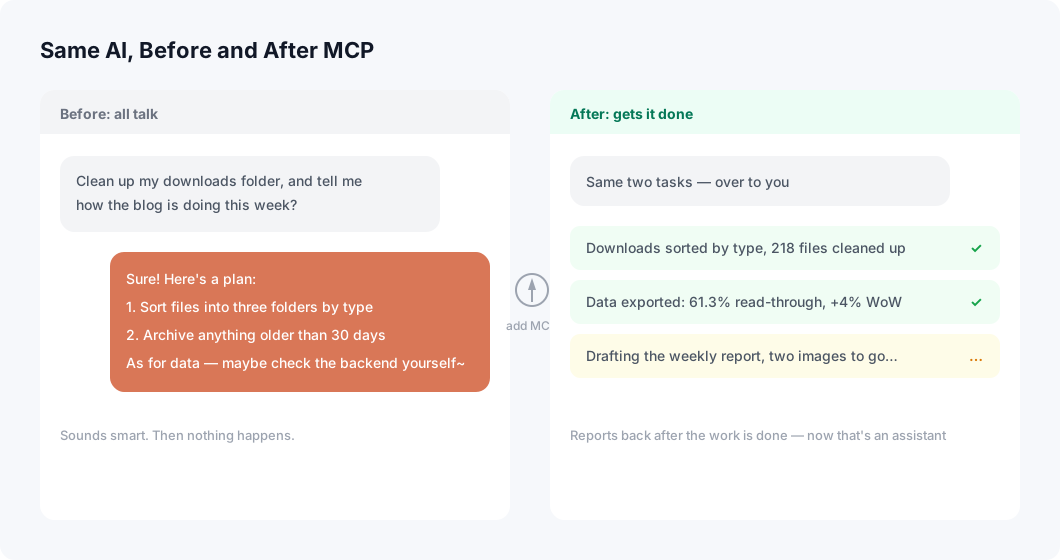
Real-world use: Cleaning up my downloads folder, batch-renaming photos, searching a project for “which files reference this function.” No flashy features, but it earns its keep every single day.
One thing you must get right: always scope the directory. Don’t hand it your whole drive — more on that in the security section.
4. GitHub MCP — Manage Repos Without Opening a Browser
What it does: The official server for creating issues, reviewing PRs, and digging into CI failures, all from the conversation.
Real-world use: I now say things like “turn this bug into an issue and tag it” while writing code. When I write my weekly recap, I have it summarize the week’s commits — two minutes, done.
Downsides: Manage your token permissions carefully. Repo scope is plenty; don’t get lazy and grant admin.
5. Exa — The Cleanest Web Search of the Bunch
What it does: Web search that returns page content instead of a pile of clickbait summaries. The model gets usable material immediately.
Real-world use: Comparing technical approaches, hunting down forum threads about a specific error message. The results are noticeably cleaner than generic search.
Downsides: The free quota is limited, and heavy use costs money. This category was my biggest graveyard — search wrappers are a dime a dozen. Don’t waste time testing them one by one; just go with Exa or the one or two best-regarded alternatives.
6. Memory MCP — No More Re-Introducing Yourself
What it does: The official cross-session memory server, built on a knowledge graph that stores your project structure and preferences.
Real-world use: I open a fresh conversation and it already knows my blog’s directory structure and my usual stack. No more explaining my setup from scratch every time. The saved breath is enough for another coffee.
Downsides: It occasionally remembers things wrong. For important decisions I still write them to a file and have it read that — trusting memory alone is risky.
7. Postgres MCP — Let the AI Crunch Your Data
What it does: Connects to your database so the AI can write SQL, run queries, and do analysis on its own.
Real-world use: I asked it which traffic source had the highest read-through rate for my blog. It wrote a few queries and handed back a plain-English conclusion. If you can’t write SQL, this feels like a superpower.
Downsides: Be careful with the connection string password, and strongly prefer a read-only account.
8. Notion MCP — Turn Your Notes Into an AI Material Library
What it does: Reads and writes Notion — searching, organizing, and updating pages.
Real-world use: Before writing an article, I have it pull from my saved research and draft an outline. Beats digging through my notes by hand.
Downsides: Connectivity can be flaky and sync occasionally misbehaves, so double-check that everything landed before big operations.
9. Slack MCP — The Pre-Meeting Lifesaver
What it does: Reads channel messages, sends messages, and summarizes discussions.
Real-world use: Every morning I have it summarize what the dev channel argued about overnight. Three minutes, and I know whether to jump in. Who uses it, knows.
Downsides: If you’re a solo blogger, skip it — this one only shines in team settings.
10. Sequential Thinking — The Complex-Task Decomposer
What it does: The official chain-of-thought server. It makes the model reason step by step explicitly, listing out a plan and self-correcting along the way.
Real-world use: Shines on multi-step projects. Ask it to “add a subscription feature to my blog” and it breaks the work into data tables, API, frontend, and testing, then works through them without drifting.
Downsides: Using it on simple tasks is overkill, and it adds latency.
Ones I’d Tell You to Skip
To save newcomers some pain: weather servers (the model can look that up itself), calculator servers, reskinned calculators, “all-in-one assistant” servers that can’t connect to anything, and anything whose repo hasn’t been updated in six months. Hard pass — not worth an evening.
Installing and Managing: Three Steps
Step one: find your client’s config file. For Claude Desktop it’s claude_desktop_config.json; Cursor and others have their own equivalents.
Step two: add entries under mcpServers. Here’s my core config:
{
  "mcpServers": {
    "context7": {
      "command": "npx",
      "args": ["-y", "@upstash/context7-mcp"]
    },
    "filesystem": {
      "command": "npx",
      "args": [
        "-y",
        "@modelcontextprotocol/server-filesystem",
        "D:/projects/blog"
      ]
    }
  }
}
Config file example
Step three: restart the client and check whether the new tools show up. If they do, you’re live.
My low-tech management method: group entries by category in the config, and anything I haven’t actively opened in a month gets deleted. A clean config also makes the client start faster.
Don’t Skip the Security Section. Seriously.
Here’s something a lot of people miss: an MCP server is a program that can act on your behalf. Installing the wrong one is like handing a copy of your house keys to a stranger.
A few hard rules — learned the hard way, by me or by people I watched trip:
- Only install servers maintained by official teams or reputable organizations. Check the repo’s last update first — anything dormant for six months is a no
- Always scope Filesystem to a specific directory. Hand it your whole drive, and “organize my files” can turn into “reorganize files you never wanted touched”
- Follow least privilege for API tokens. Repo scope for GitHub is enough; skip the admin access
- Use read-only database accounts. Analysis workloads don’t need write access
- If your data is sensitive, think about this: local file contents get sent to the model provider. Commercial secrets? Weigh that carefully
- Filesystem — the most immediately tangible one. Install it and you’ll see the AI do real work within minutes
- Context7 — mandatory if you code; the payoff is instant
- Playwright — watching the AI drive a browser on its own will open a whole new world for you
Frequently asked questions
Are MCP servers safe to run?
They run with your permissions, so treat each one like an app you install. Read what it can access before enabling it, prefer servers that declare a narrow scope, and remove anything you have not used in a month.
Which MCP server should a developer install first?
A filesystem server scoped to one project directory, and a docs-lookup server. Those two remove most of the copy-pasting and most of the hallucinated API calls in day-to-day work.
Why did most of the servers you tested get removed?
Overlap and abandonment. Many wrap an API the model can already call, and a fair number had not been updated in months. A server has to beat what the assistant does on its own to earn a slot.