I Tested 7 AI Agent Platforms in 2026 — Honest Rankings, Don't Pick Wrong
Verdict:n8n takes it on cost, control and a genuinely high ceiling. Make is the safer first step if you have never built a workflow before.
We paid for seven AI agent platforms and ran identical real workflows on each one. n8n won on cost and control; two of the seven we would not recommend.
On this page
Honestly, there are more companies building AI agent platforms now than companies building AI models. Every homepage says “Build AI agents in minutes.” Every single one claims to be the most powerful and the easiest to use, with screenshots that look like concept art from a sci-fi movie.
So last month I went and registered for all the mainstream platforms, paid real money for the paid tiers, and tested them against my own actual automation needs: sorting email, scraping competitor updates, scheduling social posts, processing client data. A month later, some platforms made me want to cheer and some made me want to write an angry email to their support team. This post is the result. The ranking is my opinion, and I’m not going to sit on the fence.
Verdict first. Details after.
The Quick Recommendation Table
| Rank | Platform | One-liner | Best for | Starting price (USD) |
|---|---|---|---|---|
| 1 | n8n | Best overall, freedom ceiling | Serious individuals & small teams | Free self-hosted, cloud ~$24/mo |
| 2 | Make | Most beginner-friendly | First-timers | Free tier, paid ~$10/mo |
| 3 | Zapier Agents | King of integrations, but pricey | Teams using a pile of SaaS | ~$20/mo |
| 4 | Lindy | Great for sales, meh elsewhere | Sales & customer ops | ~$50/mo |
| 5 | CrewAI | Dev’s dream, beginner’s nightmare | People who write Python | Free (open source) |
| 6 | Relevance AI | Enterprise-grade, overkill for solo | Funded company teams | Tens of $/mo to start |
| 7 | Copilot Studio | Big-tech tax, skip unless M365 | Microsoft-shop enterprises | $200/mo+ |
Prices are what I actually saw during this month of testing. These companies change pricing often, so double-check before you pull out a card.
The 7 Platform Reviews
#1: n8n — The Biggest Surprise of the Month

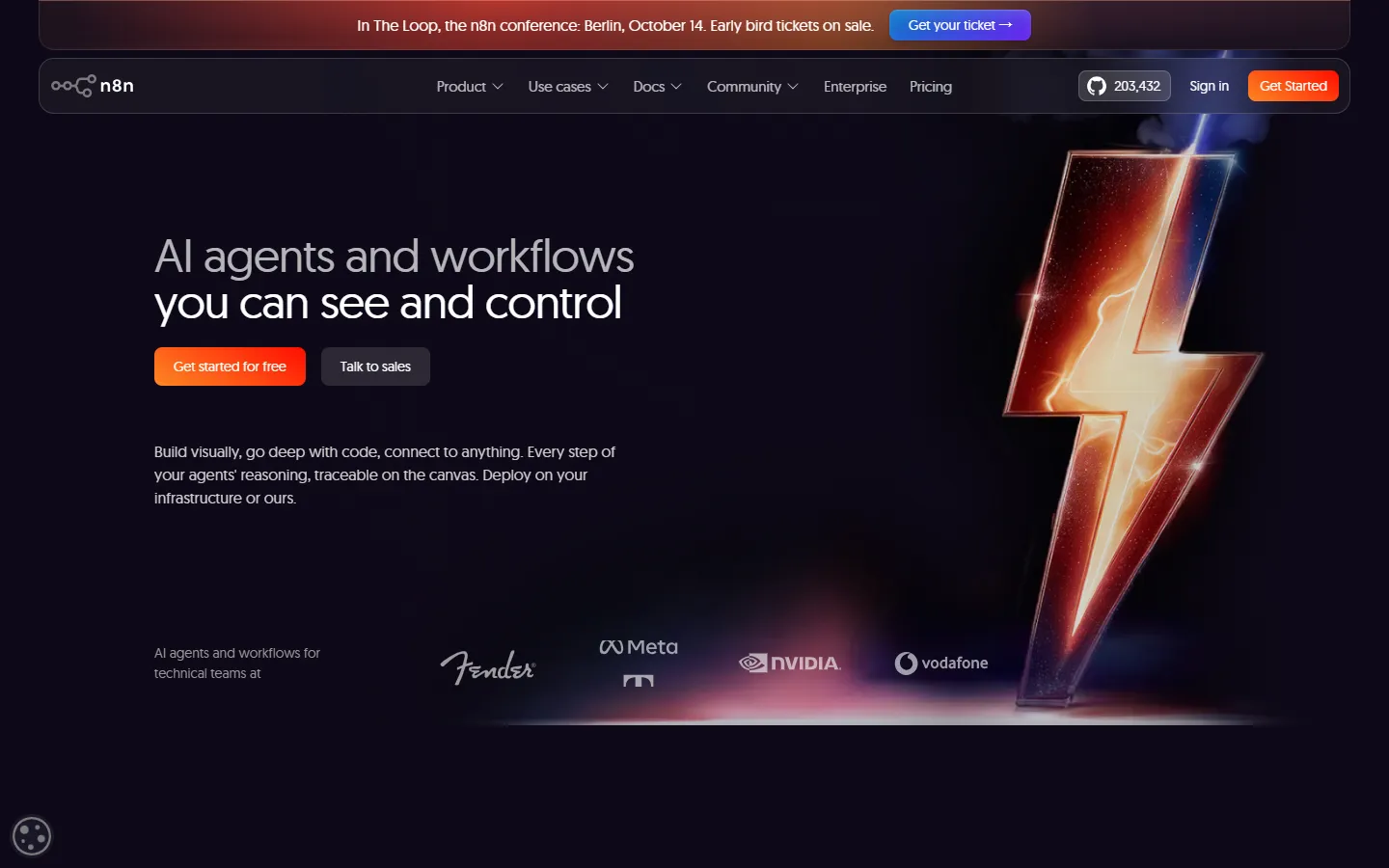
The n8n homepage. The lightning bolt is real, and so is the value.
I’ll admit my bias upfront: I ended up moving all my production workflows to n8n. It’s a fair-code open-source project you can self-host on your own server, and the self-hosted version is completely free with zero limits on operations — that alone beats the entire field. My pipeline of “scrape 20 competitor pages daily, have an AI summarize them into a briefing, auto-post to my Discord” would burn through tens of dollars in monthly task credits elsewhere. On n8n it costs me one cheap VPS.
Pros: The AI Agent node is genuinely excellent — plug in any model (OpenAI, Claude, Gemini all work), sandwich it between Code nodes for custom logic, and the error-retry and branching details are more solid than anyone else’s. Self-hosting means your data never leaves your machine. Peace of mind, maxed out.
Cons: The steepest learning curve in the top ranks. My first ten minutes staring at that canvas, I was lost. And the cloud version isn’t cheap — the pricing basically nudges you toward self-hosting.
Worth it? If you’ll spend one weekend reading docs, definately. If you won’t, see #2.
#2: Make — The Default Answer for Beginners

Make’s homepage. Purple branding, and onboarding that actually flows.
If I could only recommend one platform to a total automation newbie, it’s Make. The visual canvas is the most intuitive I’ve used — drag modules, connect them with lines, and you can literally see how data flows. I built a “new client email → AI classifies it → log to spreadsheet → auto-reply” workflow in 20 minutes without touching a line of code.
Pros: Fast to learn, a rich template library, and a free plan generous enough to teach you the fundamentals. Paid plans start around $10/mo, which is honest money for a serious tool. Their AI Agents feature landed this year too, so you can dispatch work to an agent right on the canvas.
Cons: Complex logic eventually hits the wall of visual metaphors — nest things too deep and your canvas turns into spiderweb. And as task volume grows, the bill climbs faster than I expected; one of my high-frequency workflows doubled my monthly charge.
#3: Zapier Agents — Expensive, but Genuinely Convenient

“Meet your new AI teammates” — 9,000+ app integrations is real muscle.
Zapier’s killer feature is one word: everything. Over 9,000 app integrations, so whatever weird SaaS your company runs, it’s probably in there. Telling it in plain English “every morning, summarize new leads into Slack” and having a working flow minutes later — that’s ecosystem dominance.
Pros: Integration count is in a league of its own, errors rarely occured during my tests, enterprise stability is excellent, and it practically maintains itself.
Cons: Expensive. The same workload typically costs me double what Make charges. And the Agents’ controllability is mediocre — a lot of fine-grained logic is locked away, and the black-box factor is high. It shines on simple jobs; on complex ones you’ll find the money leaves before the leverage arrives.
#4: Lindy — An AI Employee for Sales, Just Okay Everywhere Else

Lindy promises “3x your output.” For sales scenarios, it delivers.
Lindy positions itself as an “AI employee.” I ran it for two weeks on email outreach and meeting scheduling, and the experience was honestly impressive — it reads your calendar, digs through your CRM, and drafts follow-ups with real context, like an assistant who never sleeps.
Pros: Sales, support, and meeting-notes scenarios are polished to a shine, with templates that work out of the box.
Cons: Step outside those scenarios and its general automation chops trail n8n and Make by a mile. The free trial is only 7 days, and at roughly $50/mo it’s worth it as a sales outsourcer — as an all-purpose tool, you’ll be disappointed.
#5: CrewAI — LEGO for Programmers, Gibberish for Everyone Else
CrewAI is a pure developer framework in Python, open source and free. Its abstraction of “agent teams” is elegant — you define roles, hand them jobs, and let them collaborate. I built a three-agent crew (researcher + writer + reviewer) that produces weekly reports, and it looked like this:
from crewai import Agent, Task, Crew

researcher = Agent(
    role="Industry Researcher",
    goal="Collect this week's important AI news",
    backstory="Senior analyst who only trusts data-backed conclusions",
    allow_delegation=False
)

writer = Agent(
    role="Content Writer",
    goal="Turn research points into a 500-word report",
    backstory="Tech editor with a crisp writing style",
    allow_delegation=False
)

crew = Crew(
    agents=[researcher, writer],
    tasks=[
        Task(description="Compile 5 key AI industry stories this week", agent=researcher),
        Task(description="Write the report, professional and restrained", agent=writer)
    ]
)

result = crew.kickoff()
Pros: Maximum freedom, zero monthly fees, active community, and you can build literally anything.
Cons: You need Python. You manage your own API keys, runtime, and stack traces. It hands you bricks, not a finished house. If the code block above isn’t your language, this one isn’t your tool — skip it.
#6: Relevance AI — Genuinely Strong, Genuinely Expensive

Relevance AI sells enterprise agent teams, and the cost metrics on the page look impressive.
Relevance AI plays the enterprise game: its pitch is a trainable “AI workforce” — deploy, evaluate, govern, the whole package. I ran batch data processing on a trial account and the orchestration is professionally built; the monitoring dashboards are gorgeous.
Pros: Multi-agent collaboration, batch operations, and permission controls at true enterprise grade. Customer-support playbooks are mature.
Cons: Solo users and tiny teams will never touch the features that justify the price. Paid tiers start at tens of dollars a month — that’s just the entry ticket, and serious usage stacks up fast. My trial ended and I didn’t renew. It’s not that it’s bad; it’s that it doesn’t match my wallet.
#7: Copilot Studio — Sorry, I’m Talking You Out of This One

Microsoft pages are always this dignified. So are the prices.
Putting Copilot Studio last isn’t about it being badly made — inside a corporate network it actually performs. The problem is that its target customer was never you or me. The $200/mo starting point, the message-pack billing, the hard dependency on the Microsoft 365 ecosystem — as an individual player you’re basically paying tuition to look at an admin panel.
Pros: If your company already pays for the full Microsoft stack, it’s smooth for internal IT helpdesk bots and HR Q&A, the Teams and SharePoint integrations glide, and data compliance is big-league.
Cons: The billing model reads like tax law — message tiers, feature layers, add-ons. It took me half an hour to figure out what I’d actualy spent. Flexibility and third-party ecosystem? Pinned to the mat by everyone above. No M365 subscription? Close this tab.
How to Choose: Match Your Scenario
- Total beginner, first automation ever: Make. No debate. Learn the logic on the free plan first.
- In it for the long haul, willing to tinker: n8n self-hosted. Suffer one weekend, benefit forever.
- Company drowning in SaaS, want zero fuss: Zapier Agents, when budget allows.
- Sales / customer operations: Lindy for lightweight, Relevance AI for heavyweight.
- Developer who wants to build: CrewAI, with n8n handling the outer orchestration. Unbeatable combo.
- Enterprise IT in the Microsoft world: Copilot Studio, once the budget’s approved.
FAQ
Are free plans enough? For learning, absolutely. Make’s and Zapier’s free tiers will carry two or three small workflows; n8n self-hosted doesn’t even have the concept of a free tier — it just gives you everything. But the moment a workflow runs in production, free quotas won’t survive a week. Don’t cheap out on this.
Is my data safe? Three tiers: n8n self-hosted keeps data entirely on a seperate server — safest by far. SaaS tools like Make and Zapier run on standard cloud security, fine for normal business. For anything touching client privacy or sensitive data, either self-host or pick an enterprise plan with a proper data agreement. Don’t run that stuff on a free tier and pray.
Do I need to code? Not at all for Make and Zapier. n8n works code-free, and a little JavaScript is a bonus. CrewAI without programming experience? Don’t torture yourself.
Final Verdict
My top pick is n8n, for three reasons: self-hosting is free, so costs stay flat no matter how much you run; the freedom ceiling is the highest in the game — agents, code, APIs, combine at will; and your data stays on your own hardware, which truely lets you sleep at night.
But if you want to start today and read zero documentation — close this page, open a free Make account, and ship your first workflow. Tools are easy to switch. What’s fatal is staying in the “saved it, so basically learned it” stage forever.
I already stepped on the landmines so you don’t have to. Questions in the comments — I read everything.
Frequently asked questions
Are free plans enough?
For learning, absolutely. Make's and Zapier's free tiers will carry two or three small workflows; n8n self-hosted doesn't even have the concept of a free tier — it just gives you everything. But the moment a workflow runs in production, free quotas won't survive a week. Don't cheap out on this.
Is my data safe?
Three tiers: n8n self-hosted keeps data entirely on a seperate server — safest by far. SaaS tools like Make and Zapier run on standard cloud security, fine for normal business. For anything touching client privacy or sensitive data, either self-host or pick an enterprise plan with a proper data agreement. Don't run that stuff on a free tier and pray.
Do I need to code?
Not at all for Make and Zapier. n8n works code-free, and a little JavaScript is a bonus. CrewAI without programming experience? Don't torture yourself.